Zeno Connect Download Links:
- Install Zeno Connect from the Microsoft store on Windows devices
- Install Zeno Connect from Google Play on Android Devices
| Version Compatibility | ||
| FieldGenius | Connection Steps | Zeno Connect |
| pre-3.2 (Android Only) | Quick Start Guide | pre-4.2 |
| 3.2 | Video | 4.2 |
| 3.3 |
Video |
4.3 |
Antennas Options
Some receivers will have different Antenna options when connected in Zeno Connect. These Antenna options may apply offsets to the antenna height when combined with the built in antenna offsets within FieldGenius. So make sure to take note of what is selected from the info below, so that antenna offsets are not applied twice. (once from Zeno Connect, once from FieldGenius)
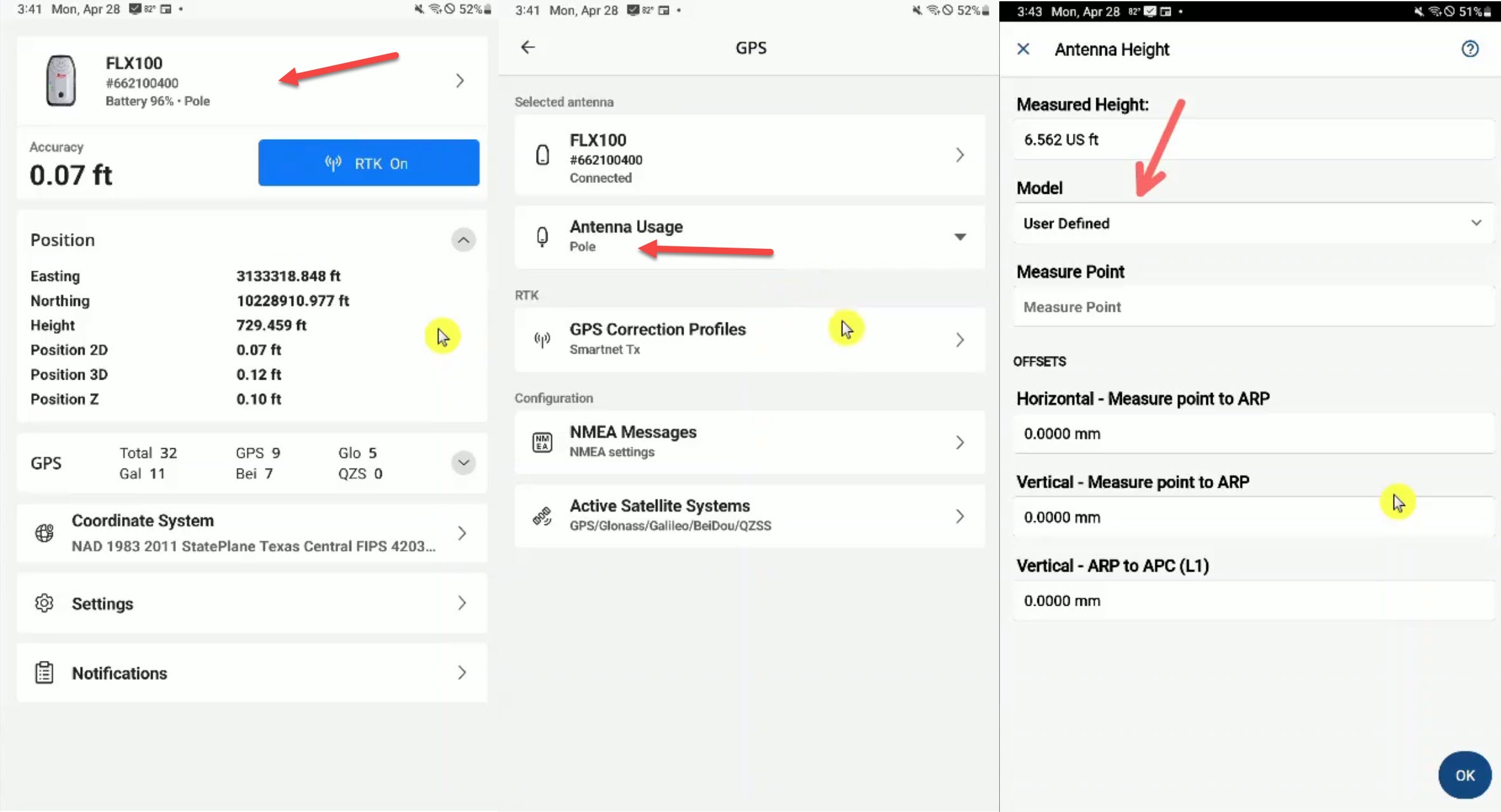
- Leica FLX 100
With the Leica FLX 100, you want to select Pole as the Antenna Usage in Zeno Connect. This will apply the antenna offsets to the height within Zeno Connect. Then, in FieldGenius, make sure the Antenna Height is set using the User Defined model, so that the offsets values are all 0, since they are already applied in Zeno Connect.
James Johnston
Comments