Printstyles are .ctb or .stb files that control lineweights and Ink Assignments when you print drawings
Visit this resource to learn more about configuring Printstyles
MicroSurvey CAD accesses Printstyles that are stored in:
C:\Users\"user"\Documents\MicroSurvey\Print Styles
or:
C:\Users\"user"\OneDrive\Documents\MicroSurvey\Print Styles
Printstyle locations do not change between releases of MicroSurveyCAD, so there are no steps to follow when migrating settings between MicroSurvey versions.
FYI, a selection of sample printstyle files that are non customizable are stored in:
C:\Program Files\MicroSurvey\MSCAD20XX\Print styles
The sample printstyles are installed with the program and copied to the Documents folder noted above when MicroSurvey is first launched
NOTE: When you first install MicroSurveyCAD search paths are set up to check for printstyles in the folder your operating system identifies as the default Documents location. Depending on when (or if) One Drive was activated on your PC, your search paths may not be correctly configured to look for prinstyles in the location that was current the last time you installed an older version of MicroSurvey CAD.
If you find you cannot access your custom printstyles after updating MicroSurvey:
open MicroSurvey CAD
type "Options"
Select the Paths/Files tab
Open the Print paths item as shown and set the path to where your custom printstyle files are located:
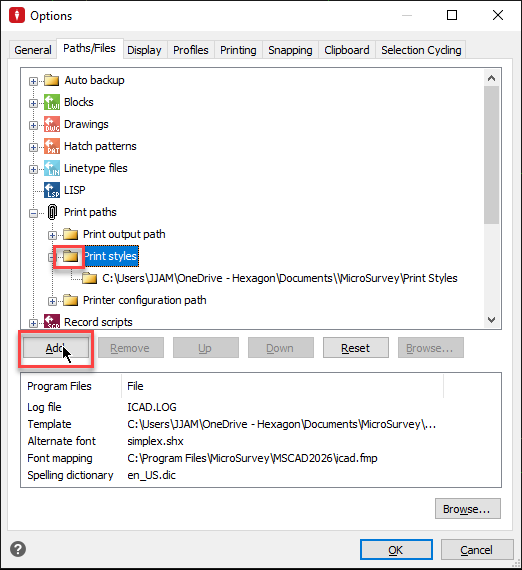
Once complete restart and test a print.
James Johnston
Comments